How we ranked trackers for an iPhone
Compatibility is not a yes-or-no question on iOS. It has four layers, and we ranked in that order, because a device that fails an early layer cannot be rescued by anything further down.
1. Will it pair with your phone at all
Two brands are simply out. Samsung’s support documentation says certain older iPhones can pair with the original Galaxy Watch, the Galaxy Watch Active and the Gear series, “but newer models like the Galaxy Watch4 and later are not compatible with iOS” — which is every Galaxy Watch Samsung currently sells. Google’s Pixel Watch support page lists an Android version floor for each generation, from Android 8.0 for the first Pixel Watch to Android 12.0 for the Pixel Watch 5, and then states plainly that “iPhones aren’t supported.” Samsung’s Galaxy Fit3 band is Android-only too.
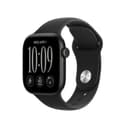
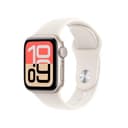
The Apple Watch has the same restriction pointing the other way, and it is worth being precise about it: every single row of Apple’s compatibility table names an iPhone. Series 12 and Ultra 4 need an iPhone 11 or later running iOS 27 or later; Series 11, SE 3 and Ultra 3 need an iPhone 11 or later on iOS 26 or later. An Apple Watch is not a tracker you keep when you switch phones. Everything else on this page — Fitbit, Garmin, Oura, Amazfit, Withings — is cross-platform, which is the quiet argument for buying one of them if you are not certain you will still be on an iPhone in three years.
2. What iOS version the app demands — and it is the app, not the device
This is the layer nobody checks, and it is where the surprises live. A tracker is useless without its companion app, so the real requirement is whichever is stricter: the hardware’s own floor, or the app’s. The published floors are further apart than you would guess. The Zepp app that every Amazfit watch pairs with runs on iOS 15.0 or later. The Oura app needs iOS 16.0. Google Health, the renamed Fitbit app, needs iOS 16.4. Then it jumps: the Withings app needs iOS 18.0, and Garmin Connect needs iOS 18.2— the highest floor of any app here, higher than some iPhones still in daily use can reach.
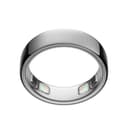
Put that next to Apple’s own requirement and a clear rule falls out. If your iPhone cannot run iOS 26, no current Apple Watch will pair with it, and neither Garmin nor Withings will either. The Fitbit Charge 6, the Oura Ring 5 and the Amazfit Active Max all still work. That is the opposite of the usual assumption that the Apple device is the safe choice on an Apple phone. One honest wrinkle: Amazfit publishes two different numbers — the Active Max support page says “Android 7.0 or iOS 14.0, or later”, while the Zepp app’s App Store listing requires iOS 15.0. We use the higher of the two, because the app is the thing you actually have to install.
3. Whether the data reaches Apple Health
On an iPhone, Apple Health is where your workouts, sleep and heart data get to be useful to something other than the app that recorded them. Both Apple Watches are native to it. Google Health is the most thoroughly documented of the rest: Google states the connection runs bothways, pulling in Apple Watch, iPhone and iPad data and pushing Fitbit fitness, vitals, sleep sessions and stages, body measurements, nutrition, cycle and mindfulness data back out, reading three months of Apple Health history when you first connect it. Garmin Connect offers to “sync with other apps like Apple Health, MyFitnessPal and Strava” in its own App Store description, and the Withings app offers to “connect your health apps like Apple Health”.
Two caveats are worth more than the rest of this section. Oura publishes that its Apple Health integration is iOS only andrequires an active membership on Gen3 or later — so the bridge into Apple Health is part of what the subscription buys, and it goes away with the subscription. And Amazfit documents Apple Health sync for the Zepp app generally (“the watch data can be synced to Strava /Apple Health/Google Fit/Relive”) but says nothing about it on the Active Max’s own support page; we report it as app-level behavior rather than a per-model promise, because that is how Amazfit publishes it.
4. What the iPhone takes away
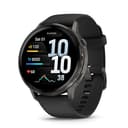
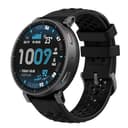
Here is the single thing most buyers discover a week after the purchase. On an iPhone, no third-party wearable can answer a message from your wrist, and three makers say so in their own documentation. Garmin’s Venu 4 manual marks both the text-message reply and the message signature as “available only for compatible Android phones”. Google states its quick replies are “currently available on devices paired to an Android phone”, and that an iPhone-paired Fitbit can only respond to Google Health app notifications — cheers, taunts and friend requests, not texts. Amazfit states the underlying rule most plainly of all: “Apple doesn’t allow third-party wearables to reply directly to notifications.” Amazfit’s documented workaround routes chat apps through a third-party service and only covers the Balance, Cheetah 2 Pro, T-Rex series, Active 3+ and Bip 6 — not the Active Max.
The second, smaller difference is where notifications get configured. Garmin’s manual splits the instructions: on Android you choose which apps notify you inside Garmin Connect, while on an iPhone you do it in the iOS notification settings. The practical effect is that a non-Apple wearable on an iPhone is a read-only notification screen. If answering a text from your wrist matters to you, that is a reason to buy an Apple Watch, and it is a better reason than any sensor on the spec sheet.
5. Battery, and the daily-charge tax
Every figure in the battery row is the manufacturer’s own claim; we own no units and have measured nothing. The spread is the whole trade-off of this category. Apple quotes up to 24 hours of normal use for the Series 12 and about 18 for the SE 3, against up to 7 days for the Charge 6, up to 12 for the Venu 4, 6 to 9 for the Oura Ring 5, up to 25 for the Active Max and up to 30 for the ScanWatch 2. A watch you charge daily is a watch that is on the charger at bedtime, which is why so many people with an Apple Watch do not get sleep data from it. Apple’s answer is charge speed rather than capacity: the Series 12 reaches about 80% in 30 minutes, and 15 minutes on the charger buys up to 12 hours of normal use — a shower is enough to cover a night. If that routine sounds like a chore, buy something from the week-or-more column and read our sleep tracker band roundup instead.
What not to buy if you own an iPhone
It is worth naming these explicitly, because they are among the most-recommended wearables on the internet and none of them will work with your phone:
- Any Samsung Galaxy Watch from the Watch4 onward, including the current models. Samsung’s US page requires an Android 11 phone, and its support site states the incompatibility outright. Our Apple Watch vs Galaxy Watch comparison walks through what the Samsung side gives up and gains.
- Any Google Pixel Watch, first generation through the Pixel Watch 5. Google’s own help page states that iPhones are not supported, and the setup app is Android-only.
- The Samsung Galaxy Fit3 band, which is Android-only even though it is one of the better cheap sleep bands otherwise.
- Anything sold with “works with all smartphones” as its only compatibility claim.Check which app it needs, then check that app’s iOS requirement in the App Store. That is the number that decides it.
If your iPhone is a few years old
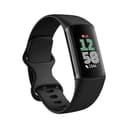
This is where the ranking changes shape. An iPhone that cannot be updated to iOS 26 rules out every Apple Watch Apple currently sells, and an iPhone below iOS 18.2 rules out Garmin and, below iOS 18.0, Withings. What is left and documented as working lower down: the Amazfit Active Max (Zepp, iOS 15.0), the Oura Ring 5 (iOS 16.0) and the Fitbit Charge 6 (Google Health, iOS 16.4). Of those three, the Charge 6 is the one we would point most people at — it has built-in GPS, an FDA-cleared ECG app in the US, a week of battery and the best-documented two-way Apple Health connection of any non-Apple device here. Its honest cost is that Fitbit keeps the deeper sleep and health analysis behind Fitbit Premium, which is the trade we flag on every Fitbit pick across the site.
An Apple Watch, or something that is not a watch?
If you want one device for workouts, notifications, replies, GPS and health sensors, and you will charge it every day, buy the Apple Watch; the integration is real and nothing else on an iPhone comes close to it. If what you actually want is night-time data and a battery you forget about, a ring or a band is the better buy, and the Apple Watch’s advantages mostly evaporate. The smart rings roundup covers the ring option against itself, and the main fitness tracker roundup ranks the whole field on sensors and battery without the platform filter this page applies. If you are weighing the two ecosystems rather than two products, the Apple Watch vs Garmin comparisonis the one to read next — it is the same argument as our Garmin pick here, at more length.
What this data is good for, and what it is not
Three devices on this page carry an FDA-cleared ECG feature in the US, and Apple’s hypertension and sleep apnea notifications are regulated features with published limits — Apple states hypertension notifications are not intended for people under 22, people already diagnosed with hypertension, or pregnant people, and that sleep apnea notifications are available on Series 9 and later, Ultra 2 and later, and the SE 3. None of that makes any of these a diagnostic device. Readiness and sleep scores are directional: useful for noticing that your resting heart rate has drifted across a hard month, much weaker as an account of any single night. Treat a heart-rhythm, breathing or blood-pressure flag as a reason to talk to a doctor, not as a result.